
全栈开发需要掌握的深度取决于具体工作。使用 Node.js 时,为了理解其运行方式,我阅读了部分源码并尝试直接使用 V8 执行 JavaScript。
当时网上资料大多集中于开发 addons,而且 V8 经历过一次较大的 API 升级,部分旧资料已经不适用。本文记录基于当时 V8 API 的实验过程。
Node.js 基于 V8 执行 JavaScript。V8 读取 JavaScript 源码,通过 JIT 编译生成机器码后执行。执行性能还受代码特征、运行时优化和宿主环境影响。
安装依赖工具
先配置环境。访问 V8 主页 https://code.google.com/p/v8/,在 wiki 中查找 BuildingWithGYP;该页面已迁移到其他地址。

该页面提到 gclient,V8 使用它管理源码依赖。gclient 已成为 depot_tools 的子项目,可通过其主页链接进入 depot_tools: https://code.google.com/p/gclient/。

以下使用 macOS 的安装方式:
Installing on Linux and Mac
- Confirm
gitis installed. git 2.2.1+ recommended. - Fetch depot_tools:
$ git clonechromium/tools/depot_tools.git - Git at Google - Add
depot_toolsto your PATH:$ export PATH=`pwd`/depot_tools:"$PATH"- Yes, you want to put depot_tools ahead of everything else, otherwise gcl will refer to the GNU Common Lisp compiler.
- You may want to add this to your
.bashrcfile or your shell’s equivalent so that you don’t need to reset your $PATH manually each time you open a new shell.
建议预先安装 Xcode,以获得后续构建所需的开发工具。
安装 V8
使用以下两个命令配置并同步源码:
gclient config https://chromium.googlesource.com/v8/v8.git
gclient sync
gclient sync 会下载并同步后续依赖。下载时间取决于网络条件;本次操作约耗时 2 个小时。
生成 Xcode 工程
进入刚下载的 V8 目录,执行以下命令:
build/gyp_v8 -Dtarget_arch=x64随后可使用 Xcode 打开 /build 目录下的 all.xcodeproj。
创建简单的 log 函数
以下示例直接调用 V8 API,不等同于 Node.js 的完整实现。在 Xcode 中找到 sample 项目,右键复制 process target,将复制的 target 重命名为 helloV8;然后在 source group 中创建 helloV8.cpp。

将以下代码复制到新建的 helloV8.cpp:
#include "include/v8.h"
#include "include/libplatform/libplatform.h"
#include <iostream>
#include <fstream>
#include <sstream>

using namespace v8;

void printjs(const FunctionCallbackInfo<Value>& args) {
  v8::String::Utf8Value v8Str(args[0]);
  Isolate* isolate = args.GetIsolate();
  HandleScope scope(isolate);
  std::cout << *v8Str << std::endl;
  args.GetReturnValue().Set(String::NewFromUtf8(isolate, "from yeanzhi"));
}

void strLength(const FunctionCallbackInfo<Value>& args) {
  v8::String::Utf8Value v8Str(args[0]);
  Isolate* isolate = args.GetIsolate();
  HandleScope scope(isolate);
  int length = strlen(*v8Str);
  args.GetReturnValue().Set(Integer::New(isolate, length));
}

void loadjs(const FunctionCallbackInfo<Value>& args) {
  v8::String::Utf8Value v8Str(args[0]);
  std::ifstream f(*v8Str);
  std::stringbuf buf;
  f >> buf;
  Local<Value> result = Script::Compile(v8::String::NewFromUtf8(args.GetIsolate(), buf.str().c_str()))->Run();
  // Convert the result to an UTF8 string and print it.
  String::Utf8Value utf8(result);
  printf("\n%s\n", *utf8);
}

int main(int argc, char* argv[]) {
  // Initialize V8.
  V8::InitializeICU();
  Platform* platform = platform::CreateDefaultPlatform();
  V8::InitializePlatform(platform);
  V8::Initialize();

  // Create a new Isolate and make it the current one.
  Isolate* isolate = Isolate::New();
  {
    Isolate::Scope isolate_scope(isolate);
    // Create a stack-allocated handle scope.
    HandleScope handle_scope(isolate);
    auto global = v8::ObjectTemplate::New(isolate);
    global->Set(v8::String::NewFromUtf8(isolate, "printjs"), FunctionTemplate::New(isolate, &printjs));
    global->Set(v8::String::NewFromUtf8(isolate, "loadjs"), FunctionTemplate::New(isolate, &loadjs));
    global->Set(v8::String::NewFromUtf8(isolate, "strLength"), FunctionTemplate::New(isolate, &strLength));

    // Create a new context.
    Local<Context> context = Context::New(isolate, NULL, global);
    // Enter the context for compiling and running the hello world script.
    Context::Scope context_scope(context);
    // Create a string containing the JavaScript source code.
    Local<String> source = String::NewFromUtf8(isolate, "loadjs('app.js')");
    // Compile the source code.
    Local<Script> script = Script::Compile(source);
    // Run the script to get the result.
    Local<Value> result = script->Run();
    // Convert the result to an UTF8 string and print it.
    String::Utf8Value utf8(result);
    printf("\n%s\n", *utf8);
  }

  // Dispose the isolate and tear down V8.
  isolate->Dispose();
  V8::Dispose();
  V8::ShutdownPlatform();
  delete platform;

  return 0;
}
下面代码将 C++ 函数注册到 JavaScript 全局对象:
auto global = v8::ObjectTemplate::New(isolate);
global->Set(v8::String::NewFromUtf8(isolate, "printjs"), v8::FunctionTemplate::New(isolate, &printjs));
global->Set(v8::String::NewFromUtf8(isolate, "loadjs"), v8::FunctionTemplate::New(isolate, &loadjs));
global->Set(v8::String::NewFromUtf8(isolate, "strLength"), v8::FunctionTemplate::New(isolate, &strLength));
// Create a new context.
Local<Context> context = Context::New(isolate, nullptr, global);
JavaScript 运行在一个全局对象可访问的 Context 中。这里创建 printjs、loadjs、strLength 三个函数,并注册到全局对象,因此 app.js 可以直接调用它们。
以下代码进入 Context,编译并执行 loadjs('app.js'):
// Enter the context for compiling and running the hello world script.
Context::Scope context_scope(context);
// Create a string containing the JavaScript source code.
Local<String> source = String::NewFromUtf8(isolate, "loadjs('app.js')");
// Compile the source code.
Local<Script> script = Script::Compile(source);
// Run the script to get the result.
Local<Value> result = script->Run();
这段代码调用 loadjs 读取 app.js,再编译并执行调用语句。以下是 app.js 源码:
printjs("hello world")
function hello() {
  printjs("from yeanzhi")
}
hello()
var patt1 = new RegExp("e")
var myDate = new Date()
var arr = []
arr.push("2fjdsaf")
var i = 5,
  j = 1
var res = i + j
printjs(res)
if (i == 5) {
  printjs(true)
} else {
  printjs(false)
}
while (i < 10) {
  printjs("yeanzhi is supermen")
  i++
  printjs(i)
}
printjs("==============>>>>>>>>>>>>>")
printjs(strLength("yeanzhi is supermen"))
printjs(arr[0])
printjs(myDate.getTime())
loadjs
loadjs 读取待执行文件内容,编译、执行并输出结果:
void loadjs(const FunctionCallbackInfo<Value>&args){
    v8::String::Utf8Value v8Str(args[0]);
    std::ifstream f(*v8Str);
    std::stringbuf buf;
    f>>&buf;
    Local<Value> result =           Script::Compile(v8::String::NewFromUtf8(args.GetIsolate(),     buf.str().c_str()))->Run();
// Convert the result to an UTF8 string and print it.
    String::Utf8Value utf8(result);
    printf("\n%s\n", *utf8);
}
运行
运行 helloV8 target 后,app.js 会被执行:
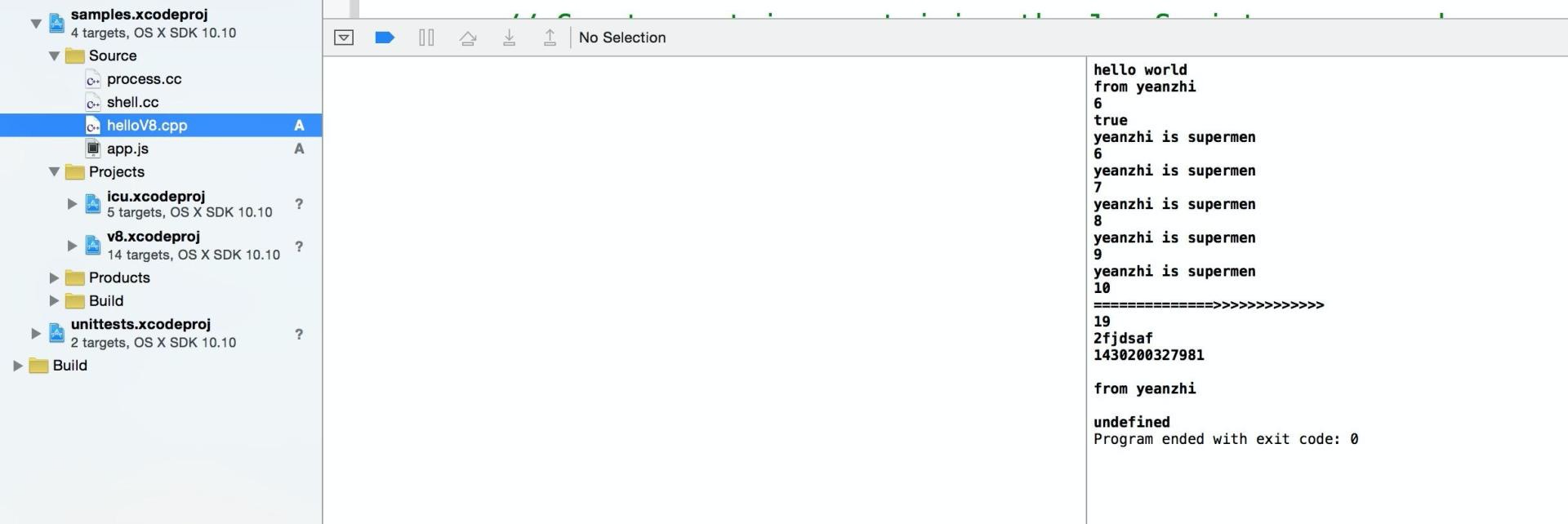
本例展示了基本流程:读取 JavaScript 文件内容,在 V8 中编译并执行。Node.js 将 V8 嵌入运行时,并在此基础上提供模块、事件循环、I/O 等能力。Node.js 的 Projects 中包含 V8 源码;其具体版本需以对应 Node.js 版本为准。
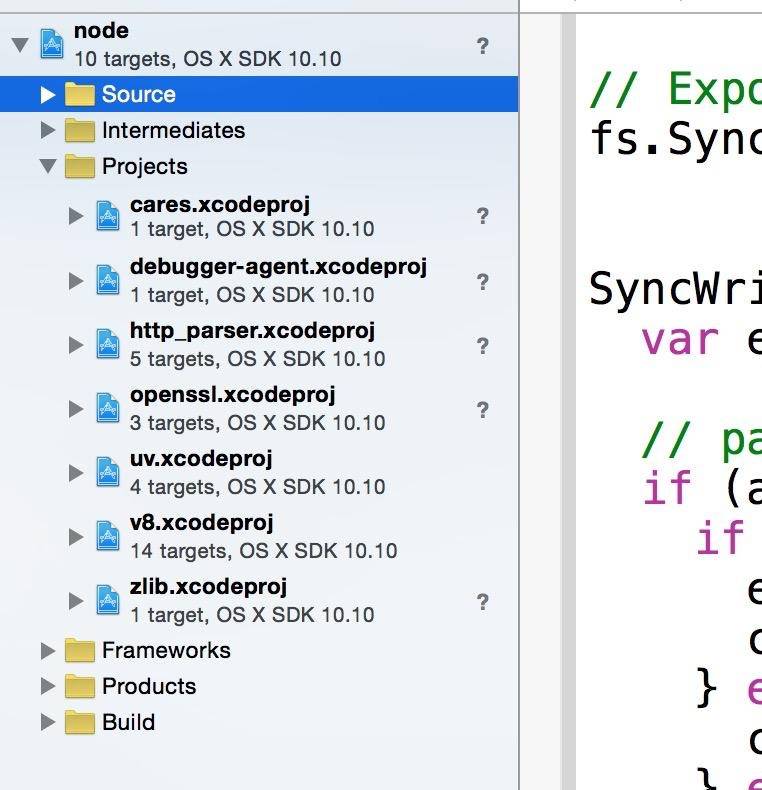
V8 在 Node.js 0.10~0.11 期间经历过较大的 API 变更,旧资料可能不适用于当前版本。更多 V8 信息可参考 https://developers.google.com/v8。本文示例依赖旧版 API;使用时需要按目标 V8 版本核对初始化、String::NewFromUtf8、Script::Compile 和 Script::Run 等接口。
